
Local Voice to Text for iOS
AI Voice Keyboard.
Dictate in any app. Record meetings. Summarize with AI. Everything on your iPhone — nothing leaves your device.

Free to start · $4.99/mo · $49.99/yr · $89.99 lifetime
See It in Action
Subtitles for your life — never miss a conversation
Subtitles for Real Life
Polished Dictation
AI Dictation Demo
Powerful On-Device AI — Free to Start
Download and start dictating at no cost. No account required. When you're ready for more, Pro unlocks advanced integrations, cloud engines, and export features — with monthly, annual, or lifetime plans.
Everything You Need
Professional-grade dictation with AI enhancement and a keyboard that works everywhere
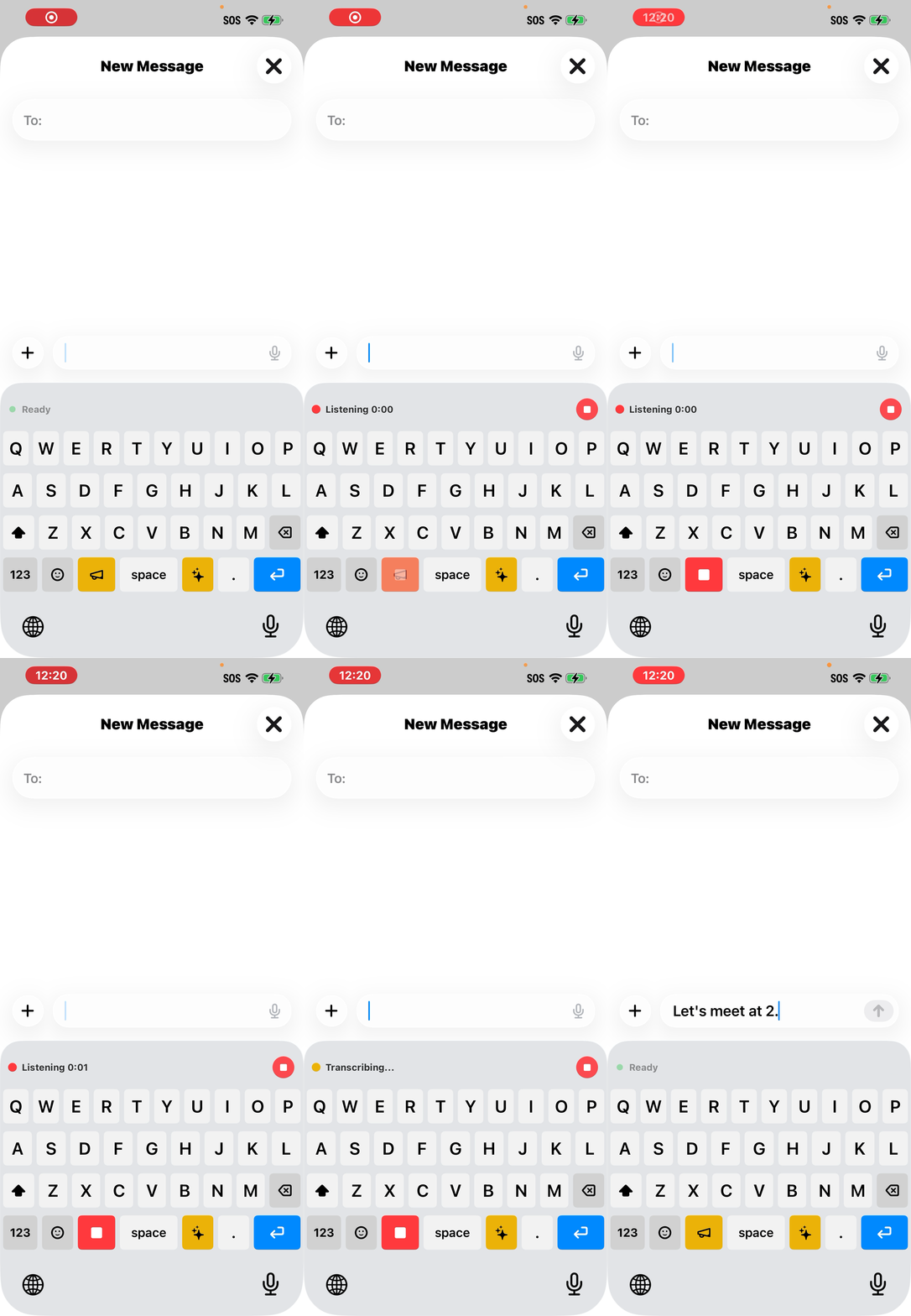
Dictate Anywhere
Our custom keyboard lets you dictate directly into Messages, Email, Notes, Safari — any app. No switching required. Just tap the microphone and speak.
- Works in every app via custom keyboard
- No app switching — dictate right where you type
- Real-time transcription as you speak
AI Text Enhancement
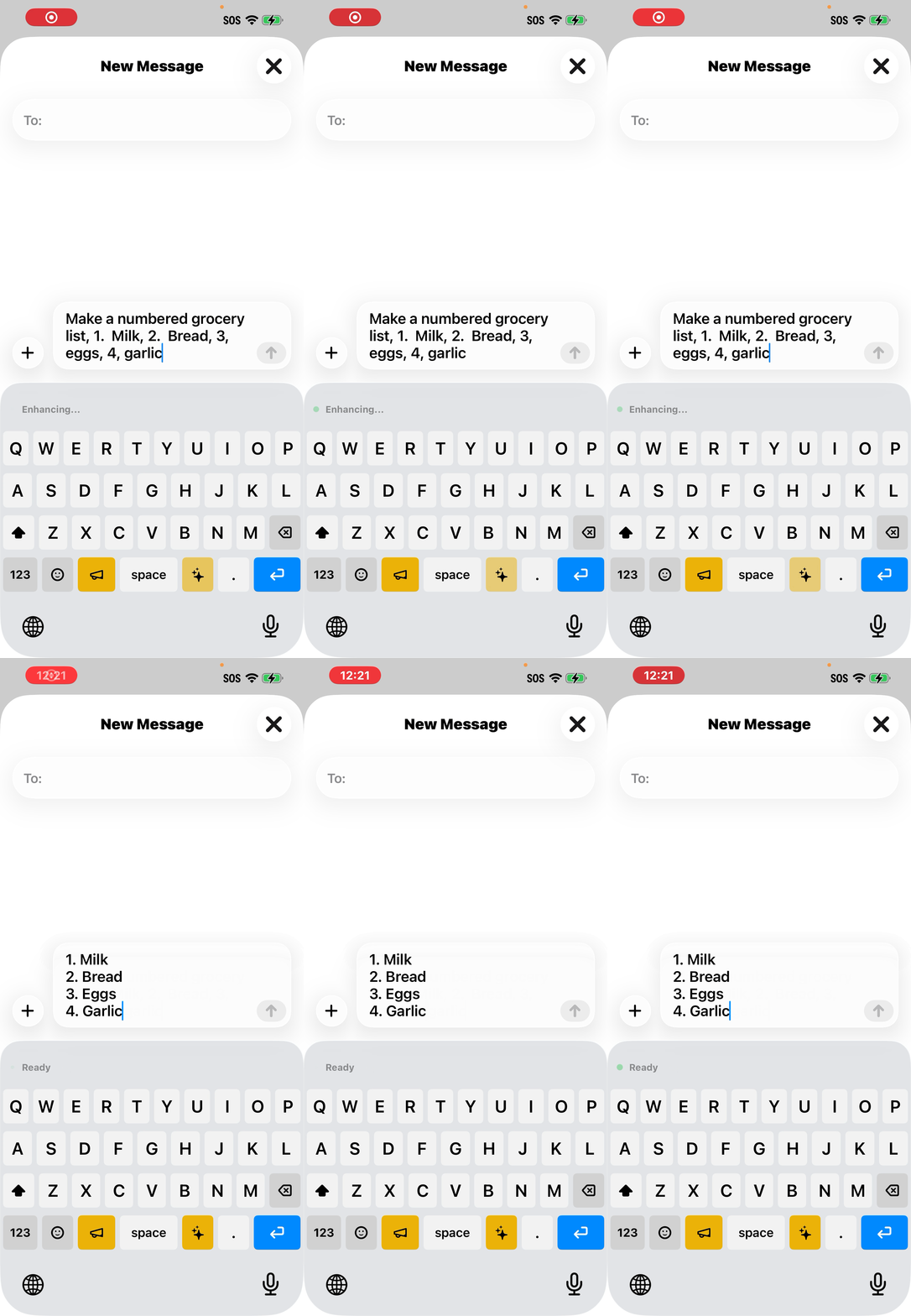
One tap to transform rough dictation into polished text. Proofread, Professional, Concise, or Friendly — powered by Apple Intelligence, processed on-device.
- Proofread, Professional, Concise, Friendly modes
- Powered by Apple Intelligence (on-device)
- One-tap polish — no manual editing needed
Dot Phrases & Snippets
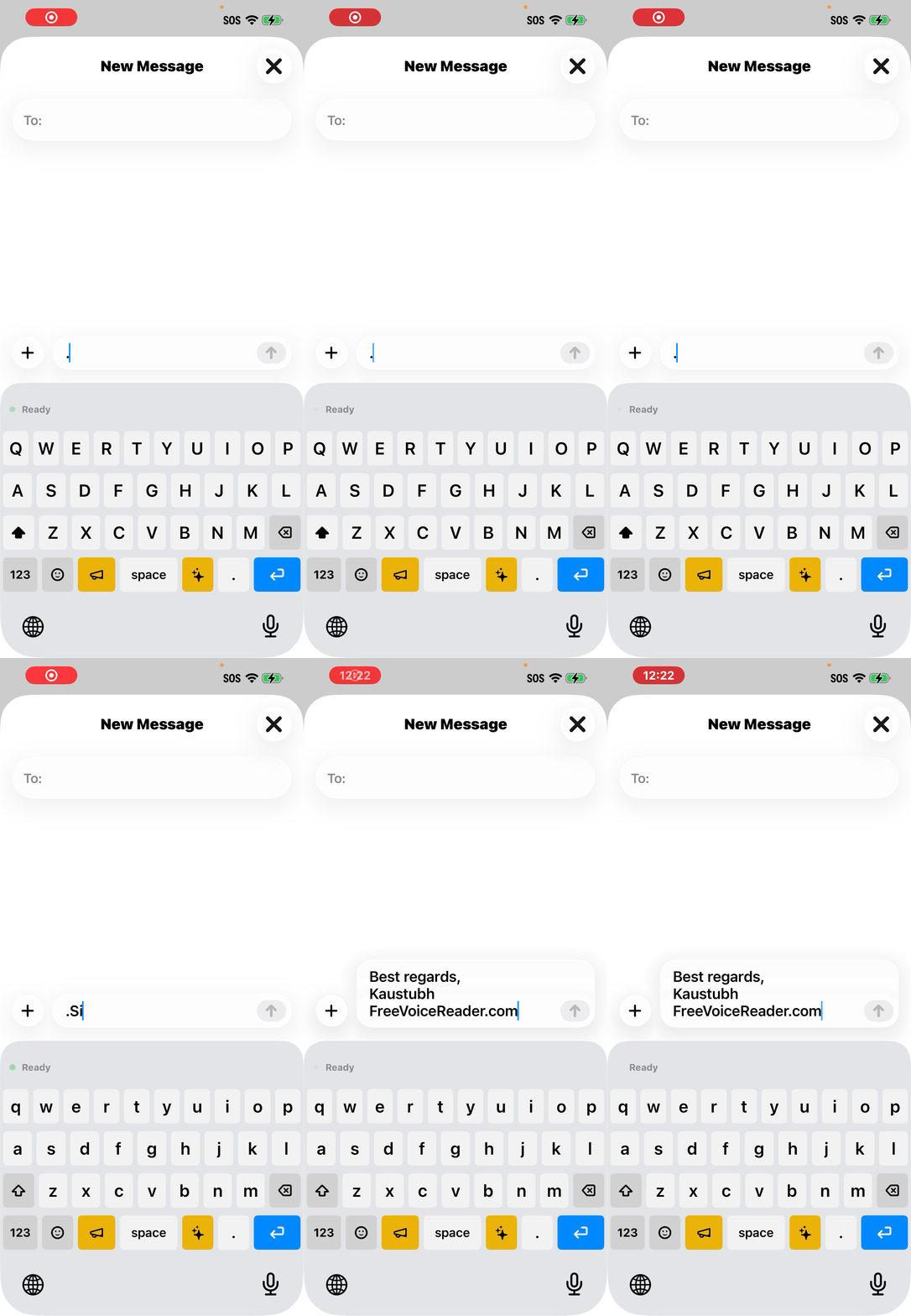
Type ".sig" to insert your signature. Say "insert address" to expand your address. Create unlimited shortcuts for the phrases you use every day.
- Unlimited custom text shortcuts
- Trigger by typing or by voice command
- Perfect for medical, legal, and business templates
Meeting Transcription
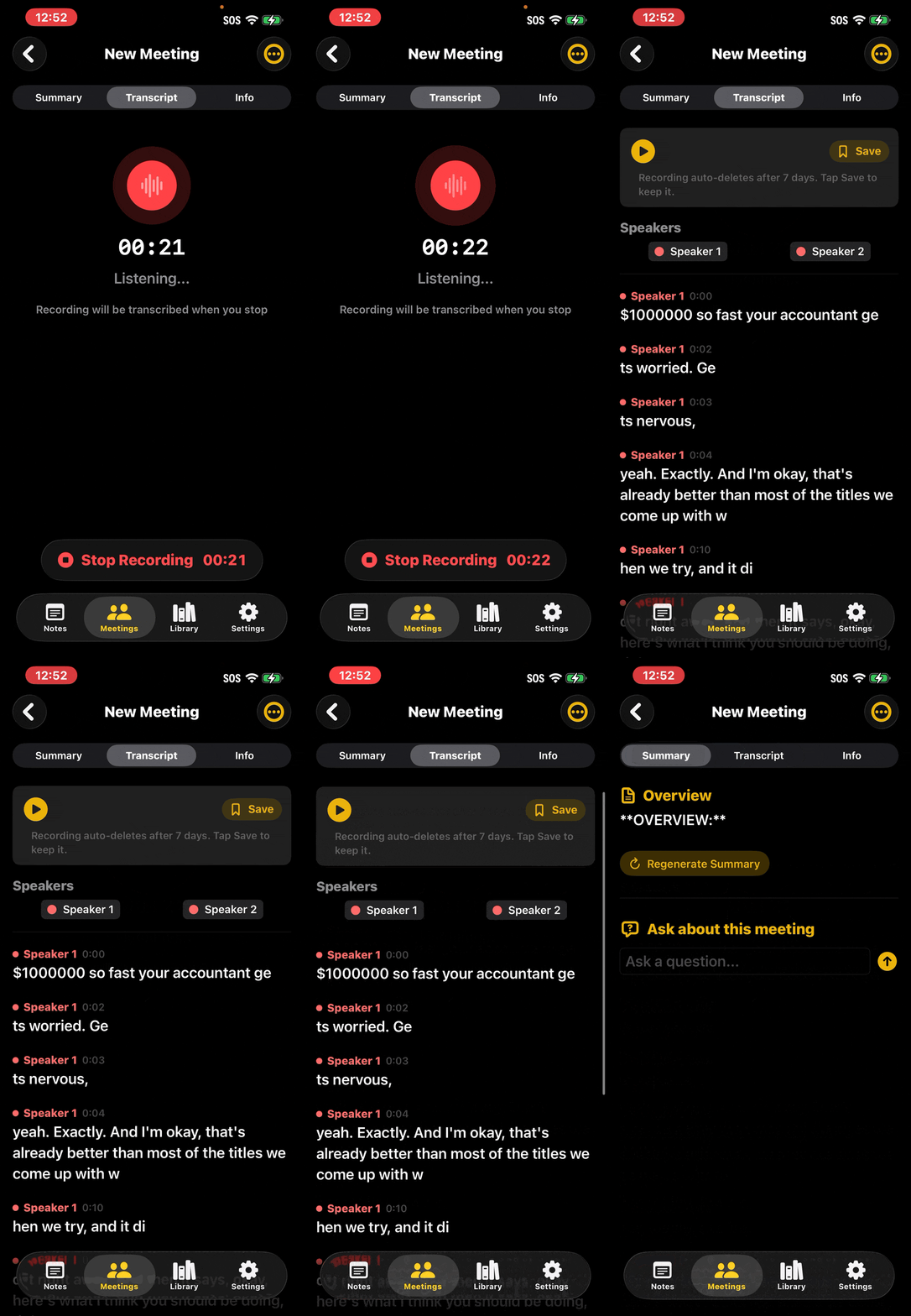
Record meetings with automatic speaker identification. AI generates structured summaries with key points, decisions, and action items. Included at no extra cost.
- Automatic speaker identification
- AI-generated summaries with action items
- Included free — improves with every update
AI Key
Copy any text, tap the AI key, and type your instruction. Reply to emails, rewrite paragraphs, answer questions — all from your keyboard. Like having a private AI assistant in every app.
- Copy an email, tap AI, type "decline politely" — get a draft reply
- Rewrite, summarize, translate, or answer questions on any text
- Runs on-device — no data sent anywhere
99+ Languages, Offline
25 languages with the fast engine, 99+ with the comprehensive engine. Auto-detect handles language switching. 16 keyboard layouts including QWERTY, QWERTZ, AZERTY, and Cyrillic. Translate any language to English on-device.
- Dictate on a plane, in a tunnel, or anywhere without signal
- Auto-detect language or pick manually
- Translate any language to English on-device
Watch, Widgets & Siri
Start and stop recordings from your wrist. Add home screen widgets for one-tap recording. Use Siri Shortcuts to dictate in the background without ever opening the app. Live Activity keeps you updated on the lock screen and Dynamic Island.
- Apple Watch app for recording control
- "Hey Siri, dictate in background" — hands-free recording
- Live Activity on lock screen and Dynamic Island
Export Anywhere
Send transcripts to Obsidian, Notion, Bear, Drafts, or any app via webhooks. Works with Zapier, Make, and any webhook-compatible service. iCloud sync keeps everything in sync across all your devices.
- Obsidian, Notion, Bear, Drafts — one tap
- Webhooks for Zapier, Make, and custom workflows
- iCloud sync across all your devices
100% Private — Your Voice Never Leaves Your iPhone
No cloud processing, no accounts, no tracking
All AI runs on-device. Nothing leaves your phone. Ever. Your voice recordings, transcriptions, and AI enhancements are processed locally. No accounts, no tracking, no analytics. Works completely offline.
Ready to Stop Typing?
Download free. Start dictating in any app. No account needed.
Loved by Users Worldwide
Real reviews from the App Store
Fantastic!
I love this app! I used to be a user of Voicenotes and ideaShell, but this app is much better than both of those. I was happy to go for the Lifetime Pro version. This app is full of great features and the developer is very receptive to feedback.
Can easily replace so many others
This is an amazing app for anyone who enjoys using dictation often. And at this low cost, it can replace a lot of very expensive alternatives. The fact that it's localized also means you can use it without internet and it's really quick.
5 Stars
Incredibly helpful - and best of all, it works offline. Privacy done right! It's become an everyday essential!
Good app~ 👍🏻
The difference from other apps is that all processes are processed by internal AI without the Internet. It's very easy to use and fast.
Teclado muy interesante
The keyboard works very well and the voice transcription tool is quite powerful. The system does all the work - no need to indicate punctuation like with Siri.
Awesome application
I particularly appreciated the concept of integrating with an Apple Watch. This allows me to transcribe my thoughts on the go, and later paste them into any AI chatbot without having to type manually.
Awesome transcription App
This app is really accurate, one of the best transcription apps for iOS. Can't wait to see what the developer will do next, and I love the keyboard design.
Game changer on the Apple Watch!
Just started using DictaWiz and I am genuinely impressed! The Apple Watch integration is what sold me. Very promising app, looking forward to seeing it evolve!
Good App
The transcript playback with word highlighting is nice - way easier to review than I expected. The app feels pretty polished already.
Free for Students
We believe every student deserves access to great tools. DictaWiz Pro is free for one year with a valid student email. Record lectures, transcribe notes, and study smarter.
Email us for your student discountEmail support@freevoicereader.com with your student email
How We Compare
DictaWiz vs the alternatives
| Feature | DictaWiz | Apple Dictation | Wispr Flow | Others |
|---|---|---|---|---|
| Price | Free / $89.99 lifetime | Free (limited) | $10–20/mo ($120–240/yr) | $5–20/mo |
| Languages | 99+ offline | Limited | Cloud-dependent | Varies |
| Accuracy | Best (Parakeet V3) | Good | Good | Varies |
| Privacy | 100% on-device | Partial | Cloud | Cloud |
| Works in any app | ||||
| AI Enhancement | Limited | |||
| Dot Phrases | ||||
| Meeting Transcription | Beta | Some | ||
| Offline | Partial |
DictaWiz is the only iOS voice keyboard that combines best-in-class accuracy, AI enhancement, meeting recording, and complete privacy — free to start, with a lifetime option.
Frequently Asked Questions
How is this different from Apple's built-in dictation?
Does it really work offline?
Is my data really private?
What's free and what's Pro?
What languages are supported?
Does the keyboard extension need Full Access?
What's the AI key?
Your Voice, Your Device, Your Data.
Dictate in any app. Record meetings. Summarize with AI. 99+ languages, Apple Watch, Siri Shortcuts — all running locally on your iPhone.
Free to start · No account · No cloud · No compromises